Jak zmienić widoczność serwera Rust
-

Cześć! Pokaże wam jak zmienić widoczność serwera na liście serwerów Rust.
Musimy znaleźć linijkę Modded w pliku konfiguracyjnym OxideMod:
Plik konfiguracyjny:\oxide\oxide.config.json{ "Options": { "Modded": true, <- Tutaj "PluginWatchers": true, "DefaultGroups": { "Players": "default", "Administrators": "admin" }, "WebRequestIP": "0.0.0.0" }, "OxideConsole": { "Enabled": true, "MinimalistMode": true, "ShowStatusBar": true }, "OxideRcon": { "Enabled": false, "Port": 25580, "Password": "", "ChatPrefix": "[Server Console]" } }Linijkę Modded musimy zmienić na false lub true
  "Options": {
    "Modded": true,
true - Modded / Zmodyfikowane
false - Community / Społeczność
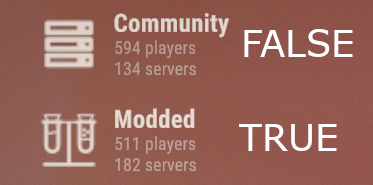
 Ostrzeżenie!
Studio Facepunch zezwala tylko na narzędzia administracyjne (które nie wpływają na rozgrywkę ani nie sprawiają, że serwer wygląda na zmodyfikowany) w sekcji serwerów Społeczność!
Cześć! Wygląda na to, że jesteś zainteresowany tą rozmową, ale nie masz jeszcze konta.
Masz dość przewijania tych samych postów za każdą wizytą? Po zarejestrowaniu konta zawsze wrócisz dokładnie do tego samego miejsca, w którym byłeś wcześniej, możesz wtedy również wybrać opcję otrzymywania powiadomień nowych odpowiedziach (e-mailem lub powiadomieniem push). Będziesz też mógł zapisywać zakładki i głosować na posty, aby okazać uznanie innym członkom społeczności.
Z Twoją pomocą tez post mógłby być nawet lepszy 💗
Zarejestruj się Zaloguj sięSugerowane tematy
-
04731
-
02588
-
 071.5k